When creating professional documents in Hindi, the font you choose plays a bigger role than most people realize. A good font does more than make your text look attractive — it affects readability, conveys the right tone, ensures compatibility across systems, and determines whether your document will look consistent when shared digitally or printed.
With so many Hindi fonts available today, both legacy and Unicode-based, choosing the right one can be confusing. Many users still work with older Kruti Dev fonts and later convert their content using tools like KrutiDev to Unicode to ensure better compatibility and web support. Understanding this difference is essential when preparing professional documents.
This guide covers the best Hindi fonts for professional documents, explains what makes each one suitable for formal use, and helps you decide which font works best for your specific needs whether you’re working in a legacy format or using modern Unicode standards.
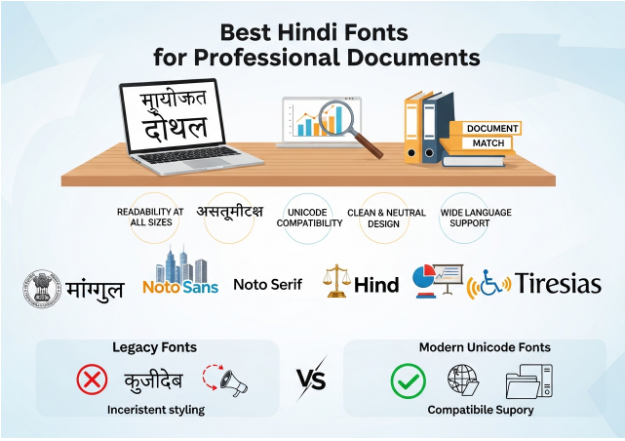
What Makes a Hindi Font Professional?
Before diving into specific fonts, it helps to understand what separates a professional Hindi font from a decorative or informal one.
Readability at All Sizes
A professional font must be easy to read whether it appears as a large heading or small body text. Characters should be clearly distinct from one another, with well-defined strokes and balanced proportions.
Unicode Compatibility
For any document intended to be shared digitally, printed, or archived, Unicode fonts are essential. Unicode fonts store actual Devanagari characters, meaning your document will display correctly on any device without requiring the recipient to install a special font. Legacy fonts like Krutidev are not suitable for professional digital documents because they rely on ASCII substitution and break when the font is not installed.
Clean and Neutral Design
Professional documents call for fonts with a clean, neutral appearance. Decorative or overly stylized fonts may look attractive in headlines or creative work but are inappropriate for reports, legal documents, government correspondence, or business communication.
Wide Language Support
A good professional Hindi font should support the full range of Devanagari characters, including all vowels, consonants, matras, conjuncts, and special marks like anusvara, chandrabindu, and nukta.
1. Mangal
Mangal is one of the most widely used Hindi fonts in professional and government settings across India. It comes pre-installed with Windows and has been the default Hindi font for many government departments for years.
Why It Works for Professional Use
Mangal is a clean, legible Unicode font designed specifically for on-screen reading and document use. Its strokes are simple and consistent, making it easy to read in body text. Because it is bundled with Windows, documents using Mangal are almost universally readable on computers across India without any additional font installation.
Best Used For
Government documents, official correspondence, legal filings, and any document that needs to be compatible with older Windows systems.
Things to Keep in Mind
Mangal was designed primarily for screen use and can appear slightly thin when printed at small sizes. For print-heavy documents, pairing it with a slightly larger font size improves readability.
2. Lohit Devanagari
Lohit Devanagari is an open-source Unicode font developed as part of the Fedora project and widely used in Linux environments. It has since been adopted across many platforms and is considered one of the most complete and well-designed free Hindi fonts available.
Why It Works for Professional Use
Lohit Devanagari has excellent coverage of Devanagari characters, including rare conjuncts and special marks. Its letterforms are clean and traditional, making it appropriate for formal documents. The font is also optimized for both screen and print, giving it versatility across different document formats.
Best Used For
Academic documents, research papers, educational materials, and professional documents in Linux or open-source environments.
Things to Keep in Mind
While Lohit Devanagari is highly functional, it may not be pre-installed on Windows systems. You will need to download and install it separately, which can be a consideration when sharing documents with others.
3. Noto Sans Devanagari
Noto Sans Devanagari is part of Google’s Noto font family, which was created with the goal of supporting all languages in the world in a visually harmonious way. It is one of the most modern and versatile Hindi fonts available today.
Why It Works for Professional Use
Noto Sans Devanagari is exceptionally well-designed with modern, clean letterforms that pair beautifully with Latin text. This makes it ideal for bilingual documents where Hindi and English appear together. It is freely available, actively maintained, and provides comprehensive coverage of all Devanagari characters.
The font comes in multiple weights, from thin to black, giving you flexibility to use it for both headings and body text within the same document while maintaining a consistent visual style.
Best Used For
Corporate reports, bilingual documents, presentations, websites, and any modern professional document where visual consistency and polish matter.
Things to Keep in Mind
Noto Sans Devanagari has a contemporary appearance that suits modern documents very well. For highly traditional or formal contexts like legal documents or government filings, some organizations may prefer a more conventional font like Mangal.
4. Noto Serif Devanagari
While Noto Sans Devanagari offers a clean modern look, Noto Serif Devanagari provides a more traditional and authoritative feel. Serif fonts are associated with formality, tradition, and long-form reading, making them an excellent choice for certain professional contexts.
Why It Works for Professional Use
Noto Serif Devanagari carries the same high-quality design and comprehensive character support as its sans-serif counterpart but with added serifs that give the text a more classical and dignified appearance. It is particularly well-suited for documents that need to convey authority and tradition.
Like Noto Sans Devanagari, it is available in multiple weights and is freely downloadable from Google Fonts.
Best Used For
Legal documents, formal reports, books, newspapers, editorial content, and any document where a traditional, authoritative tone is important.
Things to Keep in Mind
Serif fonts can be slightly harder to read on low-resolution screens. For documents that will primarily be read on screen rather than printed, Noto Sans Devanagari may be a more practical choice.
5. Poppins (with Devanagari Support via Hind)
Poppins is a widely loved Latin font, but for Hindi documents that need a similarly geometric and modern feel, Hind is an excellent alternative. Hind is a Unicode Devanagari font designed to complement geometric Latin typefaces and is available on Google Fonts.
Why It Works for Professional Use
Hind has a clean, geometric structure with open letterforms that are easy to read at a range of sizes. It works particularly well for headings, titles, and display text in professional documents and presentations. Its modern design makes it a strong choice for corporate materials, marketing documents, and business proposals.
Best Used For
Business presentations, marketing materials, corporate brochures, and documents where a modern, contemporary Hindi typography style is desired.
Things to Keep in Mind
Hind is best used for headings and display text. For long-form body text, a more traditional font like Noto Serif Devanagari or Mangal may provide better reading comfort.
6. Tiresias
Tiresias is a font originally designed with accessibility in mind, making characters highly distinguishable from one another. While not exclusively a Hindi font, its Devanagari version offers excellent clarity and is particularly useful for documents that need to be accessible to a wide range of readers.
Why It Works for Professional Use
In professional environments where accessibility is a priority, such as government publications, educational materials for students with visual impairments, or public-facing documents, Tiresias provides exceptional legibility. Each character is designed to be unmistakable, reducing reading errors significantly.
Best Used For
Accessible documents, public information materials, educational resources, and any document intended for audiences with diverse visual abilities.
Tips for Choosing the Right Hindi Font for Your Document
With several strong options available, here are a few practical tips to help you make the right choice.
Match the Font to the Context
A legal contract calls for a different font than a corporate presentation. Traditional, conservative documents benefit from serif fonts or established standards like Mangal. Modern, visually dynamic documents work better with Noto Sans Devanagari or Hind.
Always Use Unicode Fonts for Digital Documents
If your document will be shared via email, uploaded to a website, or stored digitally, always use a Unicode font. If you have existing content in a legacy font like Krutidev, use a Krutidev to Unicode converter to convert it before finalizing your document. This ensures your text displays correctly for every reader regardless of what fonts they have installed.
Test at Multiple Sizes
Always check how your chosen font looks at different sizes, both on screen and in print. Some fonts that look elegant at large sizes become difficult to read in small body text.
Be Consistent
Use no more than two fonts in a single document, one for headings and one for body text. Mixing too many fonts makes a document look unprofessional and difficult to read.
Conclusion
Choosing the right Hindi font for professional documents is a decision that affects both the appearance and the functionality of your work. Fonts like Mangal remain reliable standards for government and official use, while modern options like Noto Sans Devanagari and Noto Serif Devanagari offer greater versatility and visual quality for contemporary professional needs.
Whatever font you choose, make sure it is Unicode-based for any digital use, readable at the sizes you need, and appropriate for the tone and context of your document. With the right font in place, your Hindi documents will look polished, read clearly, and be accessible to every reader you intend to reach.